
Tired of remembering to pay for your accounting fee to us each month? Set up Direct Debit and we’ll automatically collect what’s owed straight from your business bank account — at the right time, for the right amount, every time.
Why use Direct Debit?
- Never miss a payment — no late fees, no chasing emails, no awkward conversations
- Always the right amount — we collect exactly what’s on your invoice (no more, no less)
- Cancel any time — one click in Joy Pilot, or call your bank
- Fully protected — covered by the Direct Debit Guarantee, so you get an instant refund from your bank if anything’s ever taken in error
How to set it up
It takes about a minute. Have your business bank account details handy (sort code and account number).
Step 1 — Open your Billing page
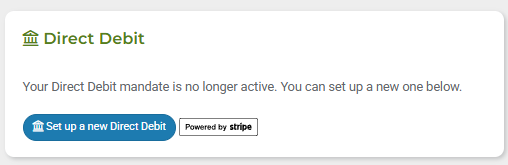
Log in to Joy Pilot and head to Billing. You’ll see a Set up Direct Debit button — click it to get started.
Step 2 — Enter your bank details
You’ll be taken to a secure Stripe page. Pop in your business bank account sort code, account number and the account holder’s name.
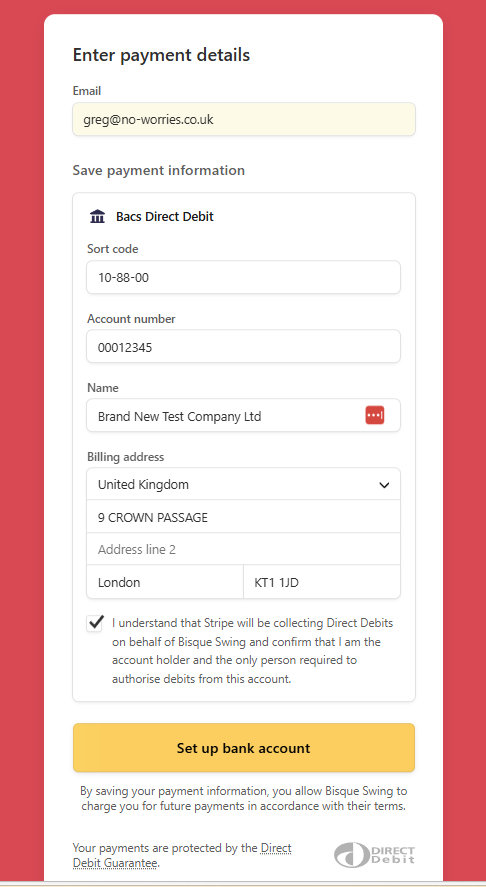
Heads up: the account needs to be a UK bank account that supports Direct Debits. Most business current accounts do.
Step 3 — Confirm and authorise
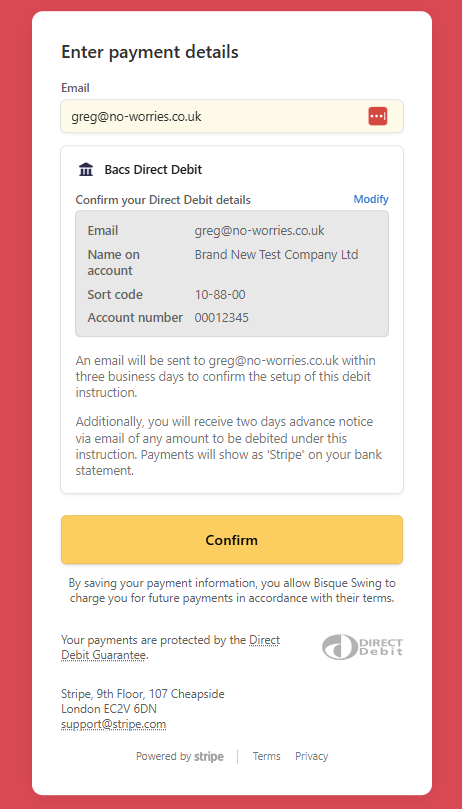
Have a quick look over the details, then confirm to authorise the Direct Debit instruction with your bank.
Step 4 — You’re all set
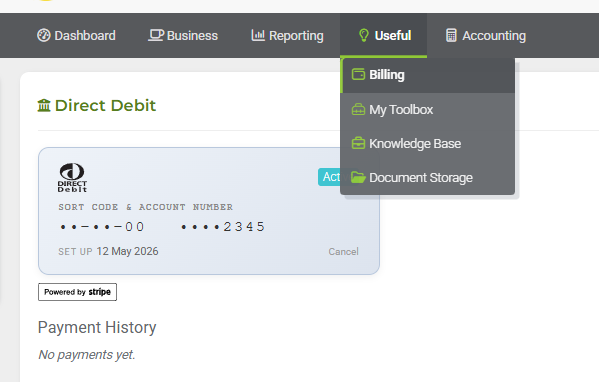
You’ll land back on your Billing page and see your Direct Debit details — your bank, the last 4 digits of your account, and the status of your mandate.
How it works from here
- It takes 3–5 working days for your bank to activate the new Direct Debit instruction. Once it’s active, you’re all set.
- We collect on the 2nd of each month, at around 6am, for any outstanding invoices on your account.
- You’ll receive a confirmation email for each payment we collect.
- Bacs Direct Debit takes 3–5 working days to clear the first time — after that, payments are smooth and reliable.
If at any point there’s nothing outstanding (or your invoices are below £1), we won’t collect anything that month — no minimum charge, no surprises.
Changing or cancelling
You can cancel your Direct Debit at any time:
- In Joy Pilot: head to your Billing page and click Cancel
- At your bank: contact your bank directly — they’ll cancel it for you
If you ever want to switch to a different bank account, just cancel the existing Direct Debit and set up a new one with the new account details.
Need help?
If anything looks off, or you’d like help getting set up, drop us a line at hello@no-worries.co.uk and we’ll sort you out.