
If you need to complete a UK Self Assessment tax return and you’ve never done one before, you must register with HMRC to obtain a Unique Taxpayer Reference (UTR). This guide walks you through the exact HMRC steps to register online.
What Is a UTR?
A UTR is a 10-digit number issued by HMRC. You need it to file a Self Assessment tax return, pay tax owed to HMRC, and correspond with HMRC about your personal tax.
You only get one UTR, and it stays with you for LIFE.
Before You Start: Government Gateway Account
To register for a UTR (Unique Taxpayer Reference) online, you’ll need a Government Gateway account.
You may already have one from checking your tax code, using the HMRC app, or dealing with HMRC in the past. If so, you can use the same account – even if you’ve never registered for Self Assessment and don’t think you have a UTR.
If you don’t already have a Government Gateway account, don’t worry, you’ll be guided through setting one up as part of the registration process. It only takes a few minutes.
💡 We recommend all clients have a Government Gateway account, even if we manage your tax returns for you. HMRC increasingly operates online, and having your own access makes things quicker and more transparent.
Already Have a Government Gateway Account? Check If You Have a UTR
If you’re not sure whether you already have a UTR:
- Sign in to your Government Gateway account
- Go to your Personal Tax Account, and look for Self Assessment. If a UTR has been issued, it will usually be shown there
You may also find your UTR on previous HMRC letters, old tax returns, the HMRC app.
If you cannot see a UTR, you can continue with the steps in this guide to register for Self Assessment and request one.
Step-by-Step: Registering for a UTR
Step 1 – Go to the HMRC Registration Page
Visit:
https://www.gov.uk/register-for-self-assessment
Click Start now.
Step 2 – Choose Why You Need a Tax Return
You’ll be asked:
“Why do you need to send a Self Assessment tax return?”
Select the option that best applies to you:
- You’re self-employed (for example, a sole trader)
- You’re a partner in a business partnership
- For another reason (for example, income from property, pensions, overseas income, or capital gains)
👉 Most people using this guide will select either the first or the last option. If you work through your own limited company, you are not self-employed, so select the last option.
Once you’ve chosen the correct option, click Next step.
Step 3 – Confirm Whether You Filed a Return Last Year
You’ll now be asked:
“Did you send a tax return last year?”
Choose the option that applies to you:
- Yes
- No, but I’ve registered before
- No, I’m registering for the first time
👉 Most people using this guide will choose “No, I’m registering for the first time”.
Once you’ve selected the correct option, click Next step.
Step 4 – Register for Self Assessment
You’ll see the page titled:
“Register for Self Assessment if you’re not self-employed”
You’ll need the following details:
- Full name
- Postal address (UK or overseas)
- Date of birth
- Daytime telephone number
- National Insurance number (if you have one)
You’ll also be asked to explain why you need to submit a tax return.
Click Start now to register online. You’ll either be asked to sign in to your Government Gateway account, or guided through creating one if you don’t already have one. Then just follow the instructions to complete the UTR registration process.
*** If you are new to the UK *** Recent arrivals to the UK sometimes find the online registration process won’t complete, usually due to address verification issues. If this happens, don’t worry, registering by post using form SA1 is a normal and accepted alternative. See “If You Cannot Register Online” below.
What Happens After You Register
1️⃣ Activation Code
HMRC will post you an activation code for your Self Assessment account:
- Within 7 working days (UK address)
- Within 21 days (overseas address)
Once it arrives, sign in and activate your account.
2️⃣ Your UTR
After activation, HMRC will issue your UTR usually within 15 working days (UK), or 21 days if you live abroad
You may see it sooner in your HMRC online account. 📬 NOTE: HMRC always sends UTRs by post, not email.
If You Cannot Register Online
If you’re unable to register online, HMRC allows you to register using a paper form called SA1.
You’ll find the SA1 form link directly on the HMRC registration page, underneath the green “Start now” button, in a section titled “If you cannot use the online service”.
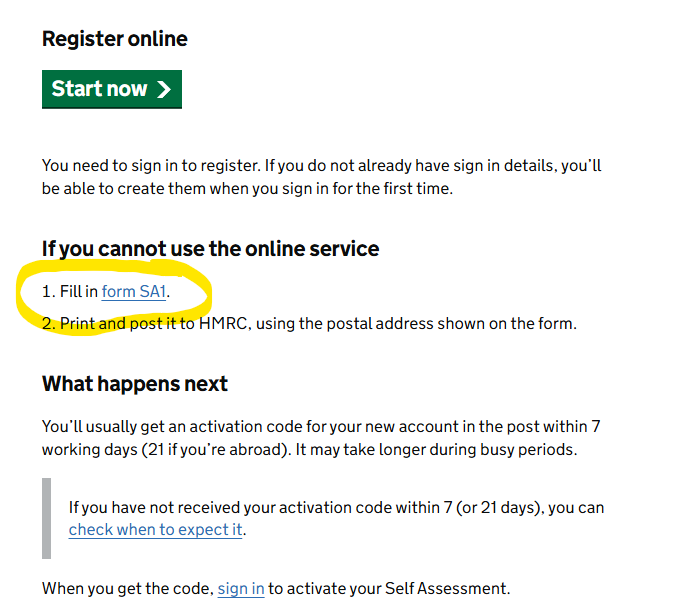
To register using this method:
- Click “Fill in form SA1” on the registration page
- Complete the form
- Print it and post it to HMRC using the address shown on the form
⚠️ Important: The SA1 paper process is significantly slower than registering online and can take several weeks.